Pages

Showing posts with label Short Sendiri. Show all posts

Friday, 7 October 2016

ShortSendiri- Monster Character Design

The wind is blowing into my mind, so that i represent it in Illustrator

Sketching
Outline


Final 1
Final 2

ShortSendiri- Collage Portraiture

Collage

I'm going to experience the Art of Collage. The task is training to combines various materials to create composition. I need to produce two collage which is portraiture and towns cape

Purpose to making Collage.

1) Prepare scissors, glue and scraps of magazine.

2) Posterize the image in Photoshop and print out.

3) Gathering varies color of shred paper by scissors.

4) Paste the shred paper on the image.


Collage Portraiture

Portrait           : Nelson Mandela
Size                 : A2
Color for use  : 25 and about


ShortSendiri- Collage

Collage

I'm going to experience the Art of Collage. The task is training to combines various materials to create composition. I need to produce two collage which is portraiture and townscape

Purpose to making Collage.
1) Prepare scissors, glue and scraps of magazine.
2) Posterize the image in Photoshop and print out.
3) Gathering varies color of shred paper by scissors.
4) Paste the shred paper on the image.


Collage Townscape

Species         : Townscape
Size              : A2

Color of use : 20 and about


ShortSendiri- Magazine Cover

Magazine Cover
I'm going to experience and making magazine. Magazine's contents is the works i finish in typography's classes. In the below is my magazine cover page, i have use some simple shape and fonts to do my magazine cover.


 Final


 Shapes


 Fonts


Background

Final

ShortSendiri- Series of Face

I'm going to experience and  making series of face by varied alphabet. The series of face is Greedy King, DJ, Girl, Mask Rider and Vampire.


Final


Layer 1

Layer 2


Final

ShortSendiri- Shape Alphabet

I'm going to experience and making a shape alphabet by different shape, such as : square, rectangle, triangle, circle and etc.


Final


Source Shape


Final

ShortSendiri- Light Painting With Photoshop

I'm going to experience Light Painting With Photoshop

1) Preparing laser ,tripod ,camera. Setting larger Aperture and lower Shutter Speed.
2) Switch off the light and start to take a photo.
3) During this period of time, draw a shape by laser.
 Draw a shape by laser

4) Import photo to Adobe Photoshop

5) Duplicate a layer and using Magic Wand Tool to remove background.

6) Open Free Transform mode to scale up the image.

7) Import image of drink.

8) Remove image of light to front layer and edit to Warp mode. Purpose to make it smoothly. 

9) Add Vector Mask to layer of light and remove the unnecessary part of light by Eraser Tool (Tip: White colour to cover back layer to front layer but black colour to restore the layer).

10) Open Warp mode again to warp the light.

11) Duplicate a light from original image and rotate it. Add Victor Mask to remove unnecessary part.

12) Open Warp mode to warp the light.

13) Using a Dodge Tool to shine the alcohol drink with light. 

14) Edit to Brightness and Contrast and adjust level of brightness.

15) Open a new layer and fill in black colour and transform to back. Purpose to making background.

16) Duplicate a alcohol drink with light and transfer to Blend Mode's Soft Light .

17) Duplicate again and rotate it. Purpose to making reflect of object.

18) Transfer to Flip Horizontal.

19) Lower the opacity of image.

20) Using Blur tool fogging the light.
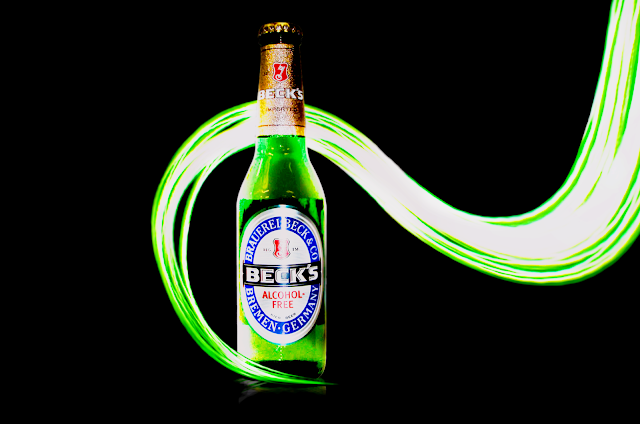

Final outcome